Mix Consoles
S2-OMS
Studio Monitor Channel
The studio monitor channel is optional and is used for the monitoring of various sources on the studio loudspeakers or studio headphones.
⤢ Click image to enlarge
About S2-OMS
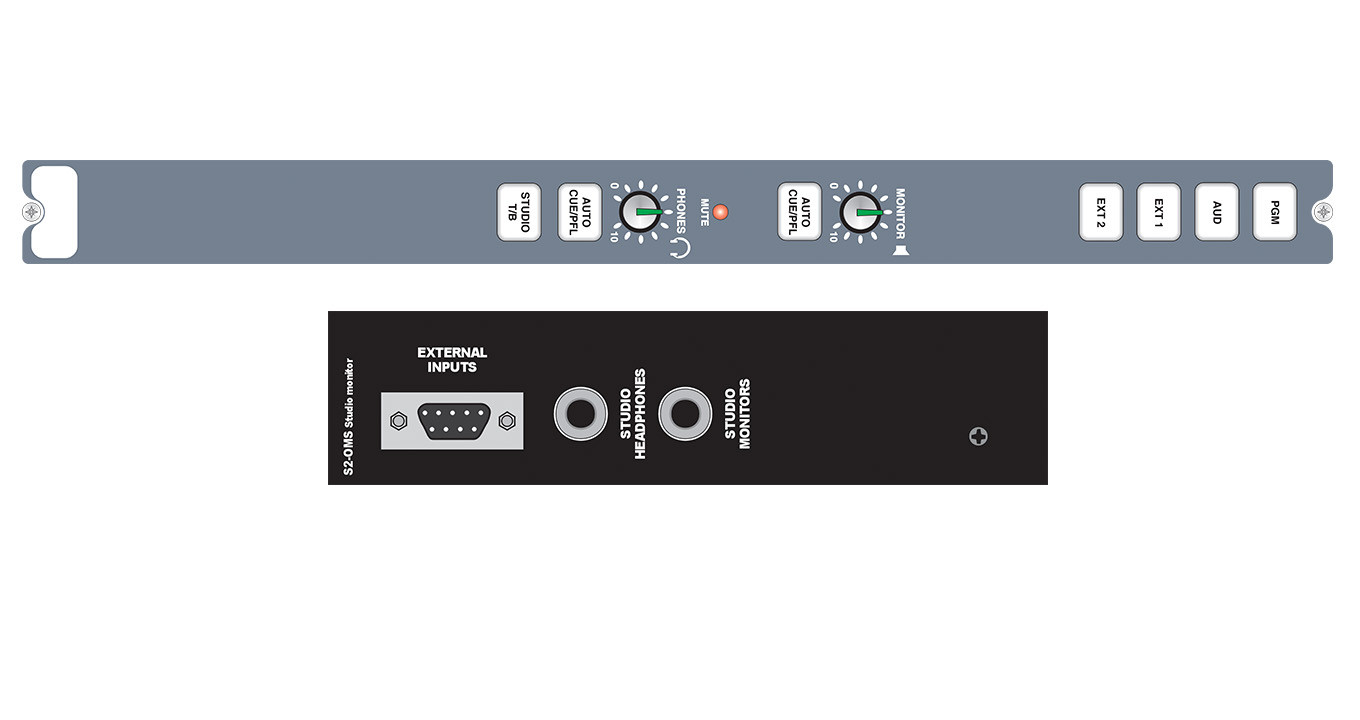
The studio monitor channel is optional and is used for the monitoring of various sources on the studio loudspeakers (MONITOR) on a 6.35mm stereo jack socket and studio headphones (PHONES) on a 6.35mm stereo jack socket.
A front panel control is used to vary the monitor level. The studio monitor loudspeaker level can be variable between 0 (cut off) and 10 (max). The output will need to be fed to a suitable power amplifier to drive the loudspeakers. Headphones with impedances of 35 ohms and above can be driven directly from the channel headphone connector on the rear panel.
A four way electronically interlocking switch bank selects the source routed to the speakers and headphones from either of two external inputs (EXT 1, EXT 2), the PGM, or AUD output. The buttons illuminate to show the selected source, PGM and AUD in green, EXT 1 and EXT 2 in red. External inputs can be used for monitoring an off air signal or another studio output.
An illuminated Mute LED shows when a live microphone channel in the studio has muted the speakers. Mute outputs on the remote connector of the AUD output channel can be used to remotely illuminate “Mic Live” lights.
Green illuminated AUTO CUE/PFL buttons adjacent to each level control allow the monitoring of PFL when an input channel has been selected to CUE/PFL, either to the monitors or headphones.
A separate Studio T/B button is provided to allow the presenter/engineer to talk to the studio monitors and/or headphones and internal jumpers allow this talkback to replace or dim the selected source.
A Global Talkback system can be configured to allow every contribution point in the control room and studio to communicate with each other via their microphone and headphones.
Typical Applications
Community, student, hospital and small scale radio broadcast mixer, secondary or backup on-air mixer.Product Data
Technical Specifications
Input/Output Impedances
Input/Output Gain Range
Frequency Response
Noise (20Hz to 20kHz)
Distortion
Crosstalk
Equalisation
Range
Common Mode Rejection Ratio
Digital I/O
Output
Power
Downloads & Resources
Support
Handbooks & Guides
Firmware
Download ↗
Firmware Notes
Full release notes for all firmware versions will appear here when available.
Brochures
Declarations
Explore More