Powering the Sonifex Ecosystem
Sonifex DMC (Discovery, Monitor & Control) Software represents a step forward in how our products integrate and perform in your critical environments. Available as a free download, this powerful application enables you to easily discover and monitor Sonifex Dante and RAVENNA devices across your network, with control functionality also available on supported devices.
Overview
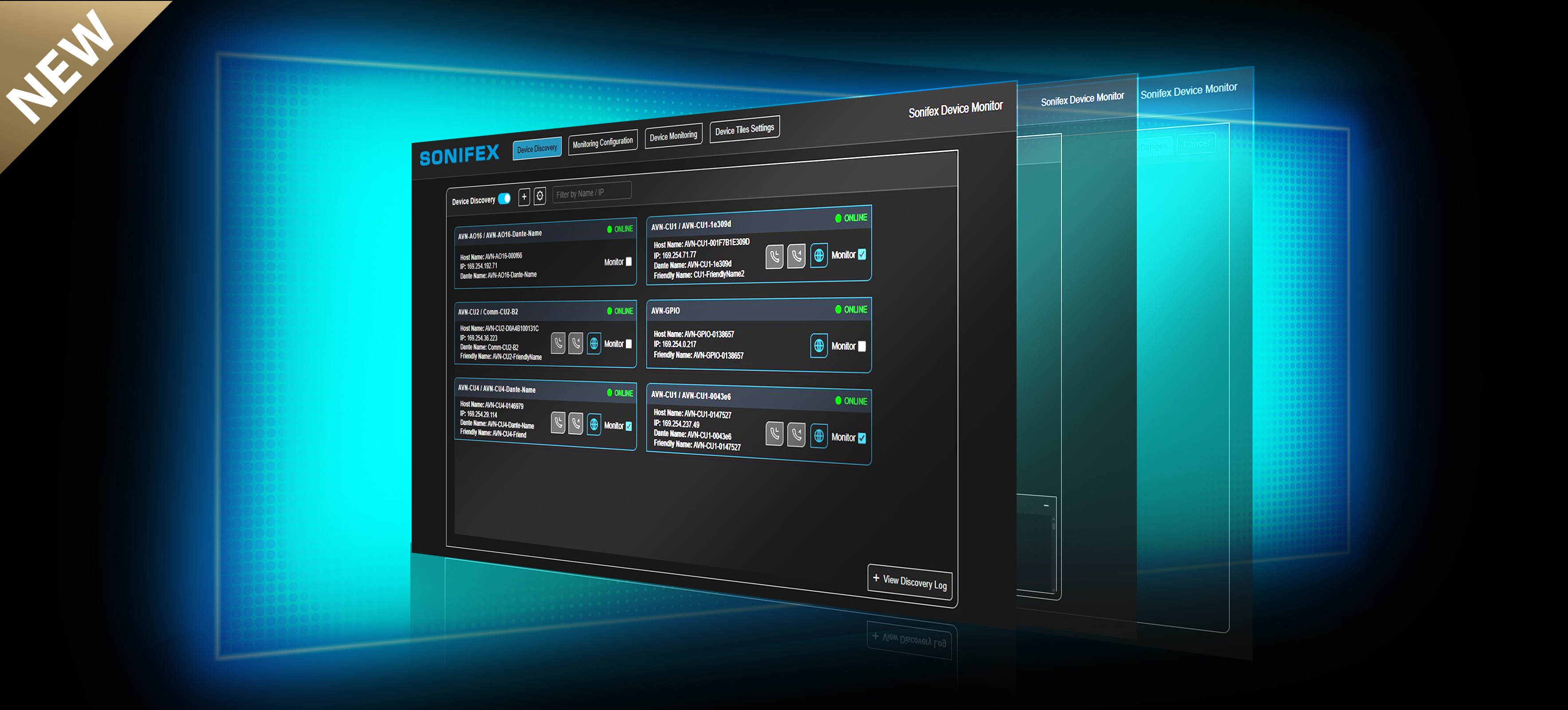
DMC is both a discovery tool and an operator interface for Sonifex devices on the network. It automatically identifies supported Sonifex equipment, providing a centralised overview of devices within an installation. For Sonifex products that feature a web GUI, DMC also provides immediate access to the device’s web interface when more detailed configuration or control is required. The functionality available within DMC is device dependent, with different products offering different levels of monitoring and control. DMC provides clear online and offline status information for discovered devices, allowing an operator to quickly see which units are available and communicating with the network. If a monitored device goes offline, DMC can provide a notification, helping to alert the operator to a potential network, power, or equipment issue without requiring them to continually check individual devices. This is particularly valuable in larger installations where a single operator may be responsible for multiple units.
DMC is particularly powerful in installations where an operator is responsible for multiple Sonifex devices. Rather than opening the web GUI of each product individually, DMC provides an at-a-glance view of key information and device-specific functionality from a single interface. This is especially useful where multiple AVN-CU2’s, RM-X’s, or AVN-M8R units are deployed across a system.
Multiple Commentary Units
For installations using multiple AVN-CU2 or AVN-CU4 Commentary Units, DMC provides an additional layer of communication between the central DMC operator and individual Commentary Unit operators. Each CU2 or CU4 operator can request assistance through the unit, alerting the DMC operator, who can then respond and establish communication with the commentator. Equally, the DMC operator can initiate a call to an individual Commentary Unit when assistance or communication is required from the central operator. This two-way communication provides a practical way for both the Commentary Unit operator and the DMC operator to request help or initiate a conversation, while allowing the DMC operator to oversee multiple Commentary Units from a single location. Alongside On Air status, audio metering and other device-specific functions, this gives the DMC operator a comprehensive view of the Commentary Units within the installation without needing to open each unit’s GUI individually.
Multiple AVN-M8R Units
For installations containing multiple AVN-M8R units, DMC provides a central monitoring point for microphone systems across a site. Each AVN-M8R can handle up to eight microphones, making DMC particularly useful where multiple units are installed across different rooms or locations. Operators can view signal presence and audio metering from all connected units within a single interface, providing an immediate overview of a large microphone installation without needing to access each M8R’s GUI. For example, an installation with three or more M8Rs could provide monitoring for 20+ microphones across several rooms, with DMC acting as a central listening and monitoring station for the entire system. This makes it much easier to identify a microphone that is not producing a signal, or to quickly assess the overall audio activity across the installation.
Multiple RM-X Units
For installations using multiple RM-X Reference Monitors, DMC provides an additional layer of communication and oversight between the central DMC operator and individual RM-X operators. Each RM-X operator can remain focused on monitoring and managing their own multi-source audio feed, while the DMC operator has an overall view of the connected RM-X units from a single location. If an RM-X operator requires assistance, they can raise a Help request through the unit, alerting the DMC operator. The DMC operator can then respond and establish two-way communication with the individual RM-X, allowing issues to be discussed and assistance provided without interrupting the operator’s normal workflow.
This is particularly useful in larger installations where multiple RM-X units are being used by different operators. DMC provides a central point for overseeing these users and responding to requests, without requiring the DMC operator to open and manage each RM-X GUI individually.
The Bigger Picture
DMC therefore complements, rather than replaces, the individual product GUIs. It provides the overview and day-to-day monitoring an operator needs, while giving immediate access to the web GUI of supported devices whenever more detailed configuration or control is required. This can save considerable time when managing multiple units, while giving the operator a clear view of the wider Sonifex installation.
Built to Evolve
Available as a free download, DMC reflects our commitment to helping customers get the most from their Sonifex equipment in real-world installations. The software will continue to evolve alongside the Sonifex product range, with ongoing development bringing enhanced functionality for existing products as well as support for new products as they are introduced.
As the Sonifex ecosystem continues to develop, so will DMC, providing an increasingly connected and capable way to discover, monitor and manage Sonifex equipment.
Overview
DMC is both a discovery tool and an operator interface for Sonifex devices on the network. It automatically identifies supported Sonifex equipment, providing a centralised overview of devices within an installation. For Sonifex products that feature a web GUI, DMC also provides immediate access to the device’s web interface when more detailed configuration or control is required. The functionality available within DMC is device dependent, with different products offering different levels of monitoring and control. DMC provides clear online and offline status information for discovered devices, allowing an operator to quickly see which units are available and communicating with the network. If a monitored device goes offline, DMC can provide a notification, helping to alert the operator to a potential network, power, or equipment issue without requiring them to continually check individual devices. This is particularly valuable in larger installations where a single operator may be responsible for multiple units.
DMC is particularly powerful in installations where an operator is responsible for multiple Sonifex devices. Rather than opening the web GUI of each product individually, DMC provides an at-a-glance view of key information and device-specific functionality from a single interface. This is especially useful where multiple AVN-CU2’s, RM-X’s, or AVN-M8R units are deployed across a system.
Multiple Commentary Units
For installations using multiple AVN-CU2 or AVN-CU4 Commentary Units, DMC provides an additional layer of communication between the central DMC operator and individual Commentary Unit operators. Each CU2 or CU4 operator can request assistance through the unit, alerting the DMC operator, who can then respond and establish communication with the commentator. Equally, the DMC operator can initiate a call to an individual Commentary Unit when assistance or communication is required from the central operator. This two-way communication provides a practical way for both the Commentary Unit operator and the DMC operator to request help or initiate a conversation, while allowing the DMC operator to oversee multiple Commentary Units from a single location. Alongside On Air status, audio metering and other device-specific functions, this gives the DMC operator a comprehensive view of the Commentary Units within the installation without needing to open each unit’s GUI individually.
Multiple AVN-M8R Units
For installations containing multiple AVN-M8R units, DMC provides a central monitoring point for microphone systems across a site. Each AVN-M8R can handle up to eight microphones, making DMC particularly useful where multiple units are installed across different rooms or locations. Operators can view signal presence and audio metering from all connected units within a single interface, providing an immediate overview of a large microphone installation without needing to access each M8R’s GUI. For example, an installation with three or more M8Rs could provide monitoring for 20+ microphones across several rooms, with DMC acting as a central listening and monitoring station for the entire system. This makes it much easier to identify a microphone that is not producing a signal, or to quickly assess the overall audio activity across the installation.
Multiple RM-X Units
For installations using multiple RM-X Reference Monitors, DMC provides an additional layer of communication and oversight between the central DMC operator and individual RM-X operators. Each RM-X operator can remain focused on monitoring and managing their own multi-source audio feed, while the DMC operator has an overall view of the connected RM-X units from a single location. If an RM-X operator requires assistance, they can raise a Help request through the unit, alerting the DMC operator. The DMC operator can then respond and establish two-way communication with the individual RM-X, allowing issues to be discussed and assistance provided without interrupting the operator’s normal workflow.
This is particularly useful in larger installations where multiple RM-X units are being used by different operators. DMC provides a central point for overseeing these users and responding to requests, without requiring the DMC operator to open and manage each RM-X GUI individually.
The Bigger Picture
DMC therefore complements, rather than replaces, the individual product GUIs. It provides the overview and day-to-day monitoring an operator needs, while giving immediate access to the web GUI of supported devices whenever more detailed configuration or control is required. This can save considerable time when managing multiple units, while giving the operator a clear view of the wider Sonifex installation.
Built to Evolve
Available as a free download, DMC reflects our commitment to helping customers get the most from their Sonifex equipment in real-world installations. The software will continue to evolve alongside the Sonifex product range, with ongoing development bringing enhanced functionality for existing products as well as support for new products as they are introduced.
As the Sonifex ecosystem continues to develop, so will DMC, providing an increasingly connected and capable way to discover, monitor and manage Sonifex equipment.